Dynamic banners. One template, hundreds of variants.
A dynamic banner is one template that pulls its content from a feed: product, price, stock, location or weather. BannerBazen designs the template, builds the rules into the banner and tests the edge cases. You supply the data. That way one campaign runs in hundreds of variants, all of which look as if they were made by hand.
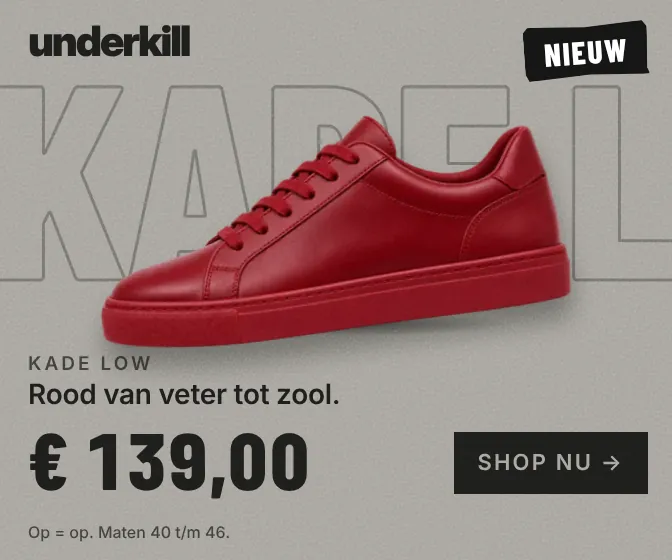
This is what a template looks like once the feed fills it. The banner on the left, the sheet on the right. Point at a row or click it, and change the price or the subtitle: the banner follows straight away.Tap a row in the sheet and change the price or the subtitle: the banner follows straight away.
Demoone template336 × 280
underkill-feed.xlsx
D2fxRed from lace to sole.
The feed of the sneaker banner: six rows
A
B
C
D
E
F
1
shoe
price
sticker
subtitle max 30
legal
colour
Kade Low
€
New
24/30
While stocks last. Sizes 40 to 46.
#A6A39C
Beton Runner
€
Drop 04
21/30
Price incl. VAT. Free returns.
#E3DDD1
Rook 2K
€
-20%
25/30
Offer valid until 30 November 2026.
#1C1C1B
Spoor Mid
€
Restock
26/30
Max. 1 pair per customer.
#2F3529
Nacht Hi
€
Last pairs
19/30
Last sizes, while stocks last.
#5C6168
Vorst Boot
€
Online only
22/30
Available online only.
#7B3A28
Subtitle: 30 characters at most.
No valid price: In store now.
No subtitle: New at underkill.
Text in black or white, whichever reads best on the colour.
Swipe for the whole sheet
A demo with a made-up shop, underkill. The shoes are made up and were made with AI; the technique is the one we use in our campaigns.
Try it
Pick a row. The banner follows.
A demo, built for this page: six rows from a feed and two formats from one template. Click a row, or turn the stock down and see what the rules do.Tap a row, or turn the stock down and see what the rules do.
The feed: six rows
City
Weather
°C
Product
Price
Stock
rain
11
Hot chocolate
€3.25
sun
27
Iced coffee
€4.10
snow
-2
Ginger tea
€2.90
cloudy
15
Cappuccino
€3.40
wind
13
Flat white
€3.60
sun
22
Homemade iced tea with fresh mint
€3.20
Swipe for price and stock
The rules in the template
The weather picks the headline, the colour and the image.
The city goes in the headline.
Stock under 10: Almost gone.
Stock at 0: back to the default variant.
A long name adjusts to fit its box.
Demoone template300 × 250
Demoone template300 × 600
A demo with made-up products. The technology is the same as in our campaigns.
Why dynamic
A hundred variants by hand isn’t a plan.
You have four hundred products, twelve regions and prices that change every week. You don’t build that by hand, and a template from a tool looks like a template from a tool.
Dynamic creative solves that, as long as someone takes the template as seriously as a master. That’s what we do: first the design, then the rules, then the data.
What you get
A template that doesn’t look like one.
Designed like a masterAnimation, timing and typography, just as with any other banner. The feed fills it, but doesn’t decide what it looks like.
Rules in the bannerWhat happens when the price drops, the stock runs out or the text gets too long. Text adjusts to fit its box.
A feed that’s ready to useA Google Sheet or your product feed, with the columns the template needs. You get that list before we start.
Edge cases testedThe longest product name, the four-figure price, the row without an image. We try those out before you see them.
“BannerBazen has been making DELTA Fiber’s dynamic banners for a few years now. They turn our propositions into banners that work, and regularly surprise us with creative concepts or technical solutions we hadn’t thought of ourselves. And just as important: they work fast and well!”
What we build per platform, and where it usually snags.
Google Display & Video 360
The template runs on Studio, with a profile, a feed and a default row. That’s how Delta Fiber’s dynamic banners are running live, via Campaign Manager 360.
Your own feed or API
A feed you manage yourselves works too. We tell you which fields have to be there, and what the banner does if one is missing.
Adways Weborama
Here we build HTML5 and rich media, like the APTO for Odido. If the banner has to run on a feed, we do that through Studio or Adform.
Adform
We build dynamic in Adform too: one template on the feed, with a default row. Technically it works differently from Studio; the result is the same.
The process
First the template. Then the feed.
01
Brief
The range, the feed or the plan for a feed, and the rules you have in your head.
02
Master
The template with one real row, completely finished. That’s what you give feedback on.
03
Formats
All the formats and all the rules, for every row in the feed.
04
QA
Every rule tried out: no price, no image, a forty-character name.
05
Live
The feed connected and the default row set. If a price changes, the banner changes with it.
One template powered by a feed: price, product, location or weather. We build the logic into the banner, you supply the data. When it loads, the banner fetches the right row and fills itself in.
02What feed do you need?
A spreadsheet or a product feed with fixed columns is enough to start with. You get the list of columns from us, and what the banner does when one is empty.
03What if there’s an error in the feed?
Then the banner falls back to a default row that’s always correct. So an empty price or a name that’s too long never appears on screen like that.
04When is dynamic worth it?
As soon as you need more variants than you’d want to keep up with by hand. With a few products, we just build a set. With a hundred, a template is cheaper, and faster with every price change.
05Can AI help with this?
We’re working on it: feed banners with brand memory. AI makes a variant per product within your brand rules, and we approve every variant before it goes live.
06How much does a dynamic campaign cost?
A fixed price for the template and the rules, and a price per format. Send a sample of your feed and you’ll have a quote within a day.

 Kade Low
 Beton Runner
 Rook 2K
 Spoor Mid
 Nacht Hi
 Vorst Boot